Recently Archived
When soft-delete is enabled, deleting a chart, dashboard, or dataset archives it instead of removing it permanently. The Recently Archived view lets owners and admins find archived objects and restore them.
A chart used by an alert or report cannot be archived while that dependency exists. In the chart list view, the archive confirmation lists the alerts and reports that use the chart; a blocked attempt names them and asks you to detach or delete them first.
This view is gated by the SOFT_DELETE feature flag. When the flag is off the
page and its menu entry are hidden, and deletes are permanent as before.
Finding archived objects
Find Recently Archived under Settings → Manage. If that entry is not available in Manage and you can access the page, it appears under Settings → User instead.
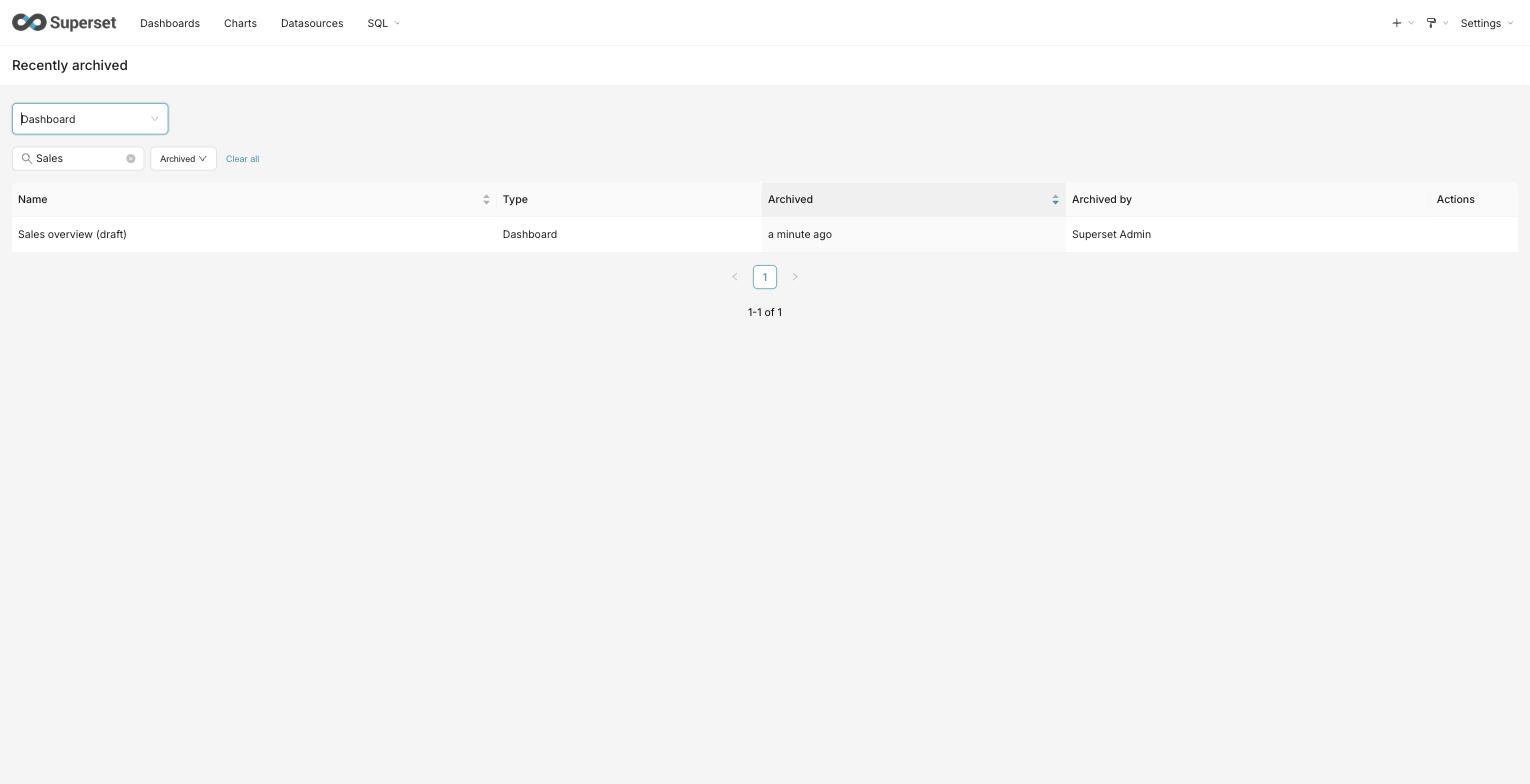
Open Recently Archived and pick a type — Chart, Dashboard, or Dataset (shown as Datasource when semantic layers are enabled) — from the Type selector. The view shows one type at a time; each type is read from its own list endpoint, so the same row-level access rules that govern the normal lists apply here.
Each row shows:
- Name — the object's name. Archived objects cannot be opened from here; recover one first and it returns to its normal list, where it opens as usual.
- Type — the selected object type.
- Archived — how long ago the object was archived (sortable).
- Archived by — the user who archived it.
Narrowing the list
- Name search filters by a substring of the object's name.
- Archived time-range presets (Last 7 / 30 / 90 days, or All time) narrow the list to objects archived within the window.
The list is sorted by archive time, most recently archived first.
Recovering an object
Use the Recover action on a row to bring the object back. It immediately returns to its normal list and disappears from the archive. Recovering is limited to the object's editors and admins; you can only recover objects you are able to see in this view.
Seeing an archived object and acting on it are separate permissions: objects you can view but not edit still appear in the list. The Recover and Delete permanently buttons appear only if you have edit permission for that object type; recovering a specific object can still be refused if you are not one of its editors.
If a dashboard filter or display control references a semantic view that was
deleted while the dashboard was archived, recovery removes that entire control
and its cascade links. Unaffected controls, including table filters, are preserved.
The REST and MCP restore responses include a warning in their message field; review the
remaining filters before relying on the restored dashboard's results. A disabled
provider or missing datasource permission alone does not remove a control whose
semantic view still exists.
Controls with invalid semantic view IDs are also removed. If the stored metadata is malformed, recovery still succeeds but leaves the metadata unchanged and skips filter cleanup; the response warns that the dashboard's filters need review.
Deleting an object permanently
Use the Delete permanently action on a row to remove an object for good. You will be asked to confirm.
This cannot be undone. Unlike archiving, it does not move the object anywhere — the object and its version history are erased, and no retention window applies. The same audience that can recover an object can delete it permanently: its editors and admins. As with recovery, the action appears only if you have edit permission for that object type; a specific object can still be refused.
Some objects cannot be deleted permanently while something still depends on them. A chart used by an alert or report, for example, is refused until that alert or report is removed, and the reason is shown. Charts that belong to dashboards are removed from those dashboards as part of the deletion; the dashboards themselves are left in place.
Before an archived dataset is deleted permanently, Superset checks which charts still use it and which dashboards contain those charts. The confirmation shows the total number of affected charts and dashboards, identifies the ones you are allowed to access, and reports the remaining objects only as restricted counts. Restricted names, identifiers, and links are not displayed. Archived dependents are included because they can still be recovered after the dataset is gone.
Deleting the dataset does not delete those charts or dashboards. They remain in place without a usable dataset and may therefore be broken. If there are no dependents, the confirmation explicitly reports zero affected charts and dashboards.
The dependency check fails closed. While it is loading, or if its result is unavailable, permanent deletion is disabled; cancel or retry the check. Superset checks again when you submit. If dependencies changed while the confirmation was open, the refreshed impact replaces the previous result and you must type DELETE again before proceeding.
Scheduled retention can also permanently delete archived objects after the retention window, subject to deletion rules and the operator configuration described below. A successful run is required; reaching the age threshold alone does not delete an object.
Configuring retention (operators)
The deletion_retention.purge_soft_deleted background task purges eligible
archived objects older than the retention window. The default Celery beat
configuration schedules it daily at 00:00 in the configured Celery timezone.
The task skips purging when SOFT_DELETE is off or the window is zero.
Before scanning a model's rows, it checks for a purge policy. Unsupported
soft-deletable models are retained without a scan or a per-row purge attempt.
Both live and dry runs report unsupported_models, a map from table name to
1 for each skipped model (not a row count), and log one warning per model.
Each skip increments deletion_retention.unsupported_models.<table> once per
run. Unsupported models are excluded from would_purge and do not count as
cascade_failures; supported models continue to use their existing policies.
An empty unsupported_models map means no registered models were skipped for
this reason. A root whose eligible-row scan raises — an unreadable column, a
transient database error — is counted in scan_failures, increments
deletion_retention.scan_failures.<root> for that root (its table name, or
its class name where reading the table name is what failed), and gauges
deletion_retention.scan_failures for the run, leaving the remaining roots to
purge normally. Rows that root had already purged before the failure stay in
its reported counts, since those deletions are committed.
Reporting a model is not the same as purging it: a host adds purge support for its own entities by installing a policy, described next.
A host distribution that carries its own soft-deletable entities can supply
their purge behavior by installing PURGE_POLICIES_FUNC: a callable returning
one PurgeEntityPolicy per root it owns. Installed policies are validated
against the discovered dependency graph exactly as the built-in ones are, and a
model that gains an installed policy stops being reported as unsupported. A
provider that fails, or returns anything other than an iterable of
PurgeEntityPolicy — a list, a tuple, dict.values() and a generator all
qualify — is logged and ignored, leaving the built-in roots unchanged. So is
a policy whose root is not a class, which everything downstream assumes, and
one that redeclares a built-in chart, dashboard or dataset root or claims
one of their entity_type names, which the cascade branches on. Two
declarations for one root are ignored too, so that root is reported as
unsupported rather than purged by an arbitrary one of them.
Superset guarantees the frame around a purge: the locked claim, the identity and eligibility predicates, the write-ahead audit record, the conditional delete and the blocked/failed accounting. Within that frame a policy either uses the shared cleanup callbacks, in which case its declared dependencies are the instructions they execute, or supplies its own callbacks and owns what happens between the claim and the delete. Either way the frame decides whether the row may be purged at all, so no policy can remove a row that is not archived and past the window.
Validation is not an attempt to prove that an arbitrary declaration executes correctly. A policy is refused when a mistake in it would delete the wrong rows or silently skip cleanup, since neither announces itself:
- its root is not keyed on a single
idcolumn, has nodeleted_atcolumn, typesuuidassa.Uuid(native_uuid=False), is not a class, claims anentity_typethe cascade branches on, or is mapped onto one of Superset's own root tables -- a different class on the chart table is still the chart rows; - its root class is named
Slice,DashboardorSqlaTable. The version cascade resolves an entity kind from the bare class name, so a host class sharing one would clear theversion_changesrows of the built-in entity carrying the same id -- a live one, not only an archived one. A fourth reserved identity alongside the model, its table and its entity type; - an owned or association edge names the root's own table, or any table
Superset's own policies name. Each such edge is executed as one
DELETE, with none of the frame around it: no eligibility predicate, no blocker, no audit record of its own. On the root's own table it removes the purged row's unarchived children; onslices,dashboardsortablesit removes charts, dashboards or datasets; onreport_scheduleit removes the very rows the built-in blocker exists to protect, and onab_userit removes users. A host root's references from Superset-owned tables are its own to clear in its callbacks, whichPRESERVEleaves it free to do; - two of its roots are mapped onto one table. The index keys on the model and the scan iterates models, so both would be scanned and a row purged under whichever declarations reached it first -- a child one policy owns and the other preserves would be cleaned or orphaned by that accident. Both are dropped, as two declarations for one model are;
- a table it names cannot be resolved unambiguously without a schema, so cleanup would resolve it to a different table;
- a version target is not root-relative, so cleanup would delete another
root's history and leave this root's behind -- or the root has no version
class at all, in which case the cascade returns before reaching the target
and the history it names simply survives -- a root with a versioned child
but no version class of its own removes the declaration and clears that
history in its own cleanup. A target is also refused when it is not a
*_versionshadow: the name is resolved against the live metadata, so without the suffix it finds a real table and the version phase deletes from that instead; - it declares a listener effect, whose action decides what to delete from an
entity type a host cannot claim and so never runs. The purge deletes with
Core DML, which fires no ORM
after_delete, so a root whose registered listener would normally do that work carries it out in its own cleanup callbacks and says so withaccounts_for_own_listeners-- without which such a root could not have a policy admitted at all; - it declares a block, which would run but records a reason code in the purge
audit log, whose vocabulary is a closed set. A host refuses a purge by
raising
PurgeBlockedErrorfrom its own validator instead, where the code it records is plainly its own; - it declares a table that owns itself, an owned edge whose target is the
root's own table -- the back edge of a root/child foreign-key cycle, which
removes other live roots sharing that child -- or a table reachable only
through an association, without setting
walks_own_subtree. Cleanup that issues one statement per declared edge reaches one level and resolves each predicate through the ownership path, so without enforced foreign keys the root is purged and the rows below it are orphaned silently. A policy whosedelete_owned_childrenwalks the sub-tree itself says so with that field, rather than being recognised by which callable it holds -- wrapping the shared one keeps its behaviour while defeating any such check. The field speaks for that callback alone, so it does not exempt the association spelling of the same shape, which the bullet above refuses outright.
A host root's references from Superset-owned tables are the host's own to clean up, in its own callbacks: the tag and permission cleanups Superset runs for its roots resolve from entity types a host cannot claim, so they never run for one.
Each application resolves its own index, so two in one process do not re-resolve each other's. A provider that cannot be called -- or whose lazy payload raises while being read -- is logged, and the built-in roots answer reads for a short window before it is tried again -- so a passing outage is not remembered for the life of the process, and it is not re-attempted on every read either.
A root with no policy is skipped rather than scanned, so it is not a
failure. A pass in which every root that could be scanned failed also
increments deletion_retention.failed, the same counter a task that raises
outright increments, since that is an outage rather than the isolation the
per-root handling is for. The run itself still returns its counts, so alert
on that counter rather than on the task result.
A root typing uuid as sa.Uuid() is one known shape left to fail, and
only on a metadata database with no UUID type of its own -- SQLite, MySQL.
There the identity predicate's string binding goes through a processor that
rejects it, so every eligible row raises and is counted; on Postgres the same
declaration binds cleanly, which is why it is not refused outright.
Superset's own roots use sqlalchemy_utils.UUIDType, which accepts the
string everywhere.
Anything else is left to fail where it fails. A predicate the cleanup cannot
build raises per row and is counted in cascade_failures; an ordering a
foreign key refuses surfaces as an integrity error, which the cascade reports
as a blocked purge carrying the cascade_integrity_failure reason code and
counts in blocked_by_reference. Either way the attempt is recorded against
the audit row and isolated to its own root, rather than quietly skipped.
A host that wants to confirm this hook exists before relying on it can check
for HOST_POLICIES_CONFIG_KEY in
superset.commands.deletion_retention.purge_policy; installing the key on a
version without the hook is harmless, since nothing reads it.
The window resolves in this order:
-
A host policy, when one is installed as
SOFT_DELETE_RETENTION_DAYS_FUNC. Its result is authoritative; the two sources below are not consulted. -
Otherwise a per-deployment value set with the CLI, when present:
superset deletion-retention set-window --days 60superset deletion-retention show-window # print the effective window -
Otherwise the
SOFT_DELETE_RETENTION_DAYSconfiguration value, which is seeded from the environment variable of the same name and defaults to 30.
Every source accepts whole days from -1 through 36500:
- Zero disables scheduled purging, so archived objects are kept until someone deletes them permanently by hand.
-1makes every archived object eligible on the next scheduled run. It does not start a run, and an object with a future archive time stays ineligible.- Any other negative value, a value above 36500, or a non-integer is invalid.
An invalid value defers purging; it never shortens the window. The CLI refuses to store one. An invalid stored value, configuration value, or host policy result (including a host policy that fails) is treated as zero and logs a warning. Only an absent stored value falls back to configuration, and only an absent configuration value uses the 30-day default.
SOFT_DELETE_PURGE_DRY_RUN defaults to False: scheduled purging is
destructive when it runs. Set it to True in superset_config.py and restart
the relevant processes to log what the task would purge without deleting
anything. Validate the eligible backlog before enabling live purging or
shortening a window; the first live run can process accumulated old archives.
SOFT_DELETE_PURGE_MAX_PER_RUN defaults to 1000 root charts, dashboards, or
datasets per scheduled run. One root's complete cascade counts as one and is
never split to fit the cap. Set 0 or None in superset_config.py to remove
the cap. It bounds committed deletions, not candidate evaluations: blocked roots
are re-evaluated every run, so a blocked-heavy backlog can still require
substantial work. A negative, boolean, string, or fractional value stops the
scheduled task without purging. With a positive cap configured, a live run
reports cap_reached and remaining_eligible for aged roots remaining across
all supported models. In unlimited mode, the cap and remainder fields and
their gauges are not emitted. The capped remainder includes
roots that a reference blocker may prevent from purging. A remainder-count failure,
a model scan failure, or an uncertain commit sets remaining_eligible to None
and remaining_count_complete to False; this can happen even when no purge has
been confirmed. Confirmed purge totals are retained. Inspect scan_failures,
commit_uncertain, and the deletion_retention.remainder_count_failed counter
and task logs to distinguish those cases. Dry-run scans the full
eligible backlog regardless of the cap, writes nothing, and reports
eligible_backlog plus estimated_capped_runs; the estimate assumes all
eligible roots can be purged. If a model scan fails, would_purge contains only
the counts collected before that failure; backlog_count_complete is False
and both backlog estimates are None. If the database does not acknowledge a
root purge commit, the task stops without processing another root and reports
commit_uncertain. The possible deletion reserves a cap slot, its audit row
remains pending for reconciliation, and the remainder count is incomplete.
A commit the database rejects on a live connection is instead recorded as a
failed attempt for that root, counted in cascade_failures, and the task
continues with other eligible roots under the same cap.
The operator's force-purge CLI remains uncapped.
With the default daily schedule and cap, scheduled capacity is 1,000 root
entities per day, not 1,000 physical rows. A backlog drains only when successful
purges exceed newly eligible roots: at that throughput, 1,500 newly eligible
roots per day add 500 to the backlog per day. Size SOFT_DELETE_PURGE_MAX_PER_RUN in
superset_config.py, or increase the task's beat frequency, above eligible inflow
with catch-up headroom. Repeated cap_reached=True results warrant checking the
backlog trend and capacity. Blocked roots and failures can reduce actual throughput;
increasing the cap alone does not remove reference blockers.
Running retention tasks
For automatic retention, operators need all of the following:
- A running Celery beat scheduler and workers connected to the appropriate broker and queues. See Celery configuration.
- Task registration on the workers. The default
CELERY_CONFIG.importsincludessuperset.tasks.deletion_retentionandsuperset.tasks.version_history_retention. - Entries in
CELERY_CONFIG.beat_schedulefordeletion_retention.purge_soft_deletedandversion_history.prune_old_versions. When replacingCELERY_CONFIG, preserve the default imports and schedules or supply equivalent entries; task registration alone does not schedule execution. - Retention windows other than zero and, for deletion purging,
SOFT_DELETEenabled andSOFT_DELETE_PURGE_DRY_RUN = Falsewhen real deletion is intended.
Check startup warnings for missing imports or schedules, and verify completed runs and their results in worker logs or monitoring. A configured schedule does not prove a task has run successfully. The two tasks have separate controls: the purge dry-run switch does not disable version-history pruning.
Immediate operator purge
For compliance cases that cannot wait for the window, an operator can purge a single entity immediately and irreversibly by UUID:
superset deletion-retention force-purge --uuid <uuid> --type dashboard
This CLI requires operator shell access and asks for confirmation. It can
target live as well as archived objects, bypasses the retention window, and
is not protected by SOFT_DELETE_PURGE_DRY_RUN. Existing dependency blockers
can still refuse deletion; check the command's reported result rather than
assuming the requested purge occurred.
Earlier implementations return exit status 0 even when a dependency blocks deletion or the target does not exist; implementations with the non-success exit-status fix return 1 in those cases. For deployments that may include the earlier behavior, automation must inspect the reported outcome, not treat exit status 0 alone as proof of erasure.
The purge removes the entity together with its version history. The retention window for version history itself is configured separately and is described on that page.